As a CS student, I started noticing a pattern in the way I used AI coding assistants: they were helping me finish assignments, but not always helping me learn. I’d let them handle the hardest parts of the logic, then struggle to solve similar problems on my own in interviews or exams.
That tension stayed in the back of my mind for a while. During a lab project in mid-February, I finally had a chance to do something about it. I pitched an idea to my team: what if an AI coding tool was designed to slow you down just enough to make you think?
That idea eventually turned into AntiCopilot: not just a VS Code extension, but a small system with a backend, a frontend, and editor integration, all built to help you work toward the answer instead of jumping straight to generated code.
Prototyping the VS Code Extension
I started with a small proof of concept built around editor diagnostics. The basic loop was simple: read errors and warnings from the active file, send that context to a backend, get a hint back, and show it inside VS Code through a Webview. It worked, but it also made the limitation obvious. That interaction was too narrow, and the more I explored custom UI inside the editor, the more it felt like we were forcing too much into the extension itself.
That pushed me to rethink the architecture early. After looking into tools like monaco-editor and the tradeoffs around UI flexibility, I came to a clearer split: the richer interface should live in a browser frontend, while the VS Code extension should focus on what it is naturally good at — reading editor context, detecting user behavior, and feeding signals into the rest of the system.
From there, the extension became much more interesting. I experimented with tracking editing patterns through onDidChangeTextDocument, which made it possible to estimate when someone was hesitating or stuck based on pauses and bursts of activity. I also looked into editor decorations as a way to guide attention without revealing the answer directly, and used Webview messaging to connect the extension to a backend hinting loop.
By mid-March, I felt like I had mapped out the real boundaries of what the extension could and couldn’t do. My prototype code was messy, so instead of handing that over, I wrote up a markdown guide for the team that explained the moving parts, the key APIs, and the architectural decisions behind them.
The Breakthrough: Redefining SRS for Code Learning
The hints helped in the moment, but they didn’t solve the longer-term problem. If you struggled with closures today, there was nothing in the system that would reliably bring closures back later unless you happened to run into them again. That was the point where I realized we needed some kind of review layer.
I had already been using Spaced Repetition Systems (SRS) for Japanese vocabulary, so I started experimenting with the Python implementation of the FSRS scheduler to see whether any of that logic could transfer. The problem is that traditional SRS is built around declarative knowledge: a flashcard has a prompt, an answer, and a memory you are trying to strengthen.
Coding does not work like that most of the time. What matters is not recalling a fact, but being able to apply an idea. If we turned a user’s exact mistake into a flashcard, we would mostly reinforce surface-level memory like a snippet or syntax pattern, not the conceptual misunderstanding underneath it. And asking users to manually create cards would add too much friction to be realistic.
What I ended up trying instead was to replace the flashcard itself with a review item built from a concept plus some metadata. Each item stores the concept the user struggled with, the language they were using, and a short description of the misconception.
From there, the system can generate a small coding problem each time that concept comes back up for review. Sometimes that might be debugging, sometimes code completion, sometimes predicting output. The format changes, but the underlying concept stays the same, so the review pushes toward actual understanding instead of recognition.
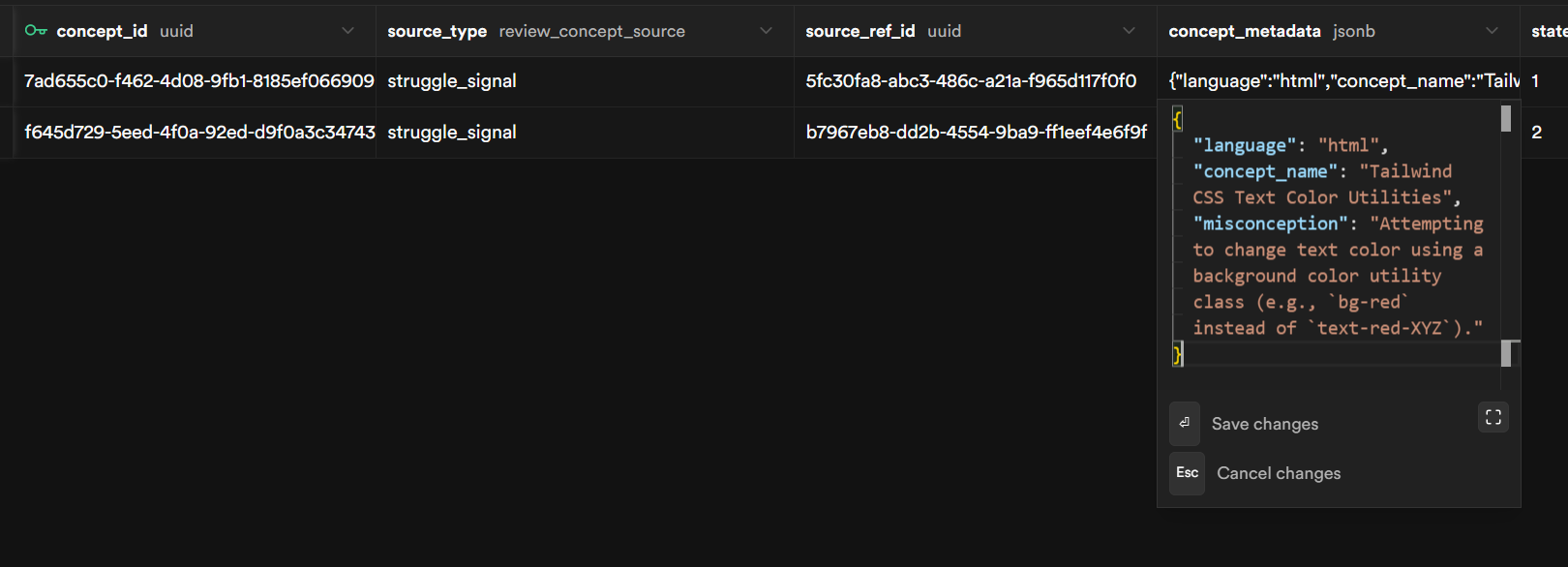
The last piece was connecting this back to the struggle signals we were already capturing in the extension. I added an explicit “I’m stuck” command. When the user triggers it, the system returns a hint, but it also creates a review item from the current context with low initial stability. In other words, getting stuck does not just help in the moment; it also feeds the review system automatically. That was the first version that really felt coherent to me.
Wrapping Up & Next Steps
Right now, the end-to-end loop actually works. You hit “I’m stuck” in VS Code, the backend pulls out the concept and misconception, sends back a hint, and creates a review item that later shows up in the frontend’s Practice view when it is due.
The frontend has four views built out—Dashboard, Roadmap, Practice, and Roadmap Management—and they are all hitting real API endpoints, not mock data.
Deep linking also works in one direction, so the frontend can open tasks directly in VS Code. The review system also runs inside the editor itself — practice challenges render in a dedicated tab alongside the code, with self-grading built in.
It’s still rough, but the pieces are talking to each other.
The next step is making the system feel less stitched together. A teammate has been working on an MCP server to give the agent richer access to the user’s coding environment, and there is also a deeper async agent in progress for more advanced roadmap generation. We also still need real-time sync between the extension and the dashboard, since changes on one side do not automatically show up on the other yet.
The foundation is there, but the next challenge is turning these connected pieces into one coherent system.